


Software Update: New navigation and features from Appraisal Scribe
Updated: Oct 4
We have updated the Appraisal Scribe navigation to improve your workflow efficiency. Our appraisal software is now more effective than ever. Here are the changes:
Navigation & Workflow

Vertical menu: The top tabs have been relocated to a permanent menu on the left side.
Progress indicators: New indicators at the section level provide an instant overview of your progress.
Quick help: Inline help text and an on-page chatbot are now accessible to assist you.
Collection Page Updates

Faster Additions: The options to add a property, section, or artist bio are now located at the top of the page.
Insert items where you want them:
Select the checkbox next to any item, then choose Property, Section, or Artist Biography — your new item will be inserted directly below your selection. If no box is checked, the item will be added to the end of the list.
Note: You can duplicate any item by clicking the Duplicate icon.
Bulk deletions: Select the checkbox next to any item on the Collection page, then click Delete. Use Select all to check every item simultaneously.
Types of Value options are now located under the Definitions section
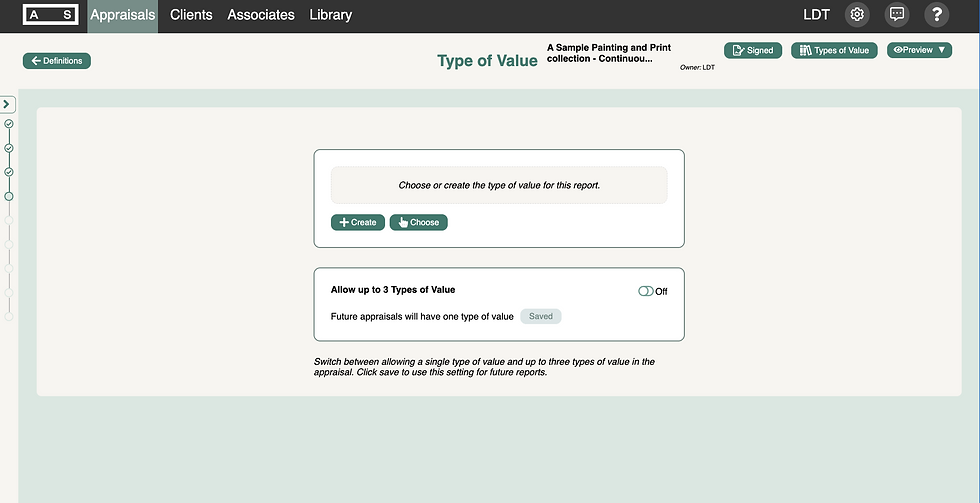
Options for one or more Types of Value have been relocated from Appraisal Settings to improve accessibility:
Go to Definitions
Click Type of Value
Toggle Allow up to 3 Types of Value on or off
Click Save to set your choice as the default for future appraisals
Click +Choose from Library or +Create Type of Value
View the video below to learn more:
We are rolling out a series of updates over the next few months and would love your input. Please let us know what you think.


Comments